公共镜像 阿里云服务器 ECS
网站编辑2020-11-07 09:57:00988
典名科技本文主要介绍阿里云服务器 ECS实例公共镜像。公共镜像类型、公共镜像列表以及Alibaba Cloud Linux系统镜像。 云服务器ECS公共镜像的特性更新动态,以及不同发行平台的云服务器ECS镜像的已知故障、故障涉及范围以及解决方法。
公共镜像由阿里云官方提供,皆以正版授权,旨在为ECS实例上的应用程序提供安全、稳定的运行环境。本文介绍公共镜像类型、公共镜像列表以及Alibaba Cloud Linux系统镜像。
公共镜像类型
阿里云提供以下两种类型的公共镜像。除Windows Server和Red Hat Enterprise Linux之外,您可免费使用其他公共镜像创建ECS实例。
| 公共镜像类型 | 描述 | 技术支持 |
|---|---|---|
| Alibaba Cloud Linux镜像 | 阿里云针对ECS实例提供的定制化原生操作系统镜像。Alibaba Cloud Linux镜像均经过严格测试,确保镜像安全、稳定,保证您能够正常启动和使用镜像。 | 阿里云将为您在使用Alibaba Cloud Linux操作系统过程中遇到的问题提供技术支持。 |
| 第三方商业镜像及开源镜像合作的正版镜像 | 由阿里云严格测试并制作发布,确保镜像安全、稳定,保证您能正常启动和使用镜像。第三方公共镜像包括:
| 请联系操作系统原厂或者开源社区获得技术支持。同时,阿里云将对问题的调查提供相应的技术协助。 |
Alibaba Cloud Linux镜像
Alibaba Cloud Linux是阿里云自主研发的Linux系统镜像,属于公共镜像。
| 操作系统类型 | 操作系统版本 | 描述 |
|---|---|---|
| Alibaba Cloud Linux 2 |
| 支持多种阿里云实例规格,包括弹性裸金属服务器。Alibaba Cloud Linux 2中默认搭载了阿里云命令行工具及其他软件包,方便您的使用。 如果您要从其他Linux版本更换为Alibaba Cloud Linux 2,可以通过创建新实例或更换系统盘的方式进行更换。 |
第三方及开源公共镜像列表
阿里云提供的第三方商业镜像及开源公共镜像,如下表所示。
- Windows系统镜像
操作系统类型 操作系统版本 Windows Server 2019 - Windows Server 2019 with Container 数据中心版 64位中文版
- Windows Server 2019 with Container 数据中心版 64位英文版
- Windows Server 2019 数据中心版 64位中文版
- Windows Server 2019 数据中心版 64位英文版
Windows Server 2016 - Windows Server 2016 数据中心版 64位中文版
- Windows Server 2016 数据中心版 64位英文版
Windows Server 2012 - Windows Server 2012 R2 数据中心版 64位中文版
- Windows Server 2012 R2 数据中心版 64位英文版
Windows Server Version ****(半年渠道) - Windows Server Version **** 数据中心版 64位中文版
- Windows Server Version **** 数据中心版 64位英文版
其中,****为半年渠道的最新版本。
备注 微软已经于2020年1月14日停止对Windows Server 2008和Windows Server 2008 R2操作系统提供支持。因此阿里云不再对使用上述操作系统的ECS实例提供技术支持。如果您有使用上述操作系统的ECS实例,请尽快更新至Windows Server 2012或以上版本。 - Linux系统镜像
操作系统类型 操作系统版本 CentOS - CentOS 8.2 64位
- CentOS 8.1 64位
- CentOS 8.0 64位
- CentOS 7.8 64位 可信版
- CentOS 7.8 64位
- CentOS 7.7 64位
- CentOS 7.6 64位
- CentOS 7.5 64位
- CentOS 7.4 64位
- CentOS 7.3 64位
- CentOS 7.2 64位
- CentOS 6.10 64位
- CentOS 6.9 64位
- CentOS 6.8 32位
备注 使用32位操作系统,请选择内存小于或等于4GiB的实例规格。CoreOS - CoreOS 2345.3.0 64位
- CoreOS 2303.4.0 64位
- CoreOS 2303.3.0 64位
- CoreOS 2247.6.0 64位
- CoreOS 2023.4.0 64位
- CoreOS 1745.7.0 64位
Debian - Debian 10.5 64位
- Debian 10.4 64位
- Debian 10.3 64位
- Debian 10.2 64位
- Debian 9.13 64位
- Debian 9.12 64位
- Debian 9.11 64位
- Debian 9.9 64位
- Debian 9.8 64位
- Debian 9.6 64位
- Debian 8.11 64位
- Debian 8.9 64位
FreeBSD - FreeBSD 11.3 64位
- FreeBSD 11.2 64位
OpenSUSE - OpenSUSE 15.2 64位
- OpenSUSE 15.1 64位
- OpenSUSE 42.3 64位
Red Hat - Red Hat Enterprise Linux 8.2 64位
- Red Hat Enterprise Linux 8.1 64位
- Red Hat Enterprise Linux 8.0 64位
- Red Hat Enterprise Linux 7.8 64位
- Red Hat Enterprise Linux 7.7 64位
- Red Hat Enterprise Linux 7.6 64位
- Red Hat Enterprise Linux 7.5 64位
- Red Hat Enterprise Linux 7.4 64位
- Red Hat Enterprise Linux 6.10 64位
- Red Hat Enterprise Linux 6.9 64位
备注 使用Red Hat镜像前,请确认实例规格族是否支持。SUSE Linux - SUSE Linux Enterprise Server 15 SP2 64位
- SUSE Linux Enterprise Server 15 SP1 64位
- SUSE Linux Enterprise Server 12 SP5 64位
- SUSE Linux Enterprise Server 12 SP4 64位
- SUSE Linux Enterprise Server 12 SP2 64位
- SUSE Linux Enterprise Server 11 SP4 64位
Ubuntu - Ubuntu 20.04 64位
- Ubuntu 18.04 64位 AMD版
- Ubuntu 18.04 64位
- Ubuntu 16.04 64位
- Ubuntu 16.04 32位
- Ubuntu 14.04 64位
- Ubuntu 14.04 32位
备注 使用32位操作系统,请选择内存小于或等于4GiB的实例规格。
公共镜像发布记录
以发布时间为顺序,介绍了云服务器ECS公共镜像的特性更新动态。
背景信息
- 如无特殊声明,更新内容适用于云服务器ECS所有可用地域。
- 公共镜像适用于大多数实例规格族,但存在一部分实例规格族不适用。这些实例规格族只能选用指定的公共镜像,详情请参见:
- 可信镜像
- AMD镜像
CentOS
| 版本 | 镜像ID | 发布时间 | 发布内容 |
|---|---|---|---|
| CentOS 8.2 | centos_8_2_x64_20G_alibase_20200914.vhd | 2020-09-14 |
|
| CentOS 7.8 | centos_7_8_x64_20G_alibase_20200914.vhd | 2020-09-14 |
|
| CentOS 6.10 | centos_6_10_x64_20G_alibase_20200914.vhd | 2020-09-14 |
|
| CentOS 8.2 | centos_8_2_x64_20G_alibase_20200824.vhd | 2020-08-24 |
|
| CentOS 7.8 | centos_7_8_x64_20G_alibase_20200817.vhd | 2020-08-17 |
|
| CentOS 6.10 | centos_6_10_x64_20G_alibase_20200817.vhd | 2020-08-17 |
|
| CentOS 8.2 | centos_8_2_x64_20G_alibase_20200717.vhd | 2020-07-17 |
|
| CentOS 7.8 | centos_7_8_x64_20G_alibase_20200717.vhd | 2020-07-17 |
|
| CentOS 6.10 | centos_6_10_x64_20G_alibase_20200717.vhd | 2020-07-17 |
|
| CentOS 7.8 | centos_7_8_x64_20G_alibase_20200622.vhd | 2020-06-22 |
|
| CentOS 8.2 | centos_8_2_x64_20G_alibase_20200616.vhd | 2020-06-16 |
|
| CentOS 6.10 | centos_6_10_x64_20G_alibase_20200616.vhd | 2020-06-16 |
|
| CentOS 8.1 | centos_8_1_x64_20G_alibase_20200519.vhd | 2020-05-19 |
|
| CentOS 7.8 | centos_7_8_x64_20G_alibase_20200519.vhd | 2020-05-19 |
|
| CentOS 6.10 | centos_6_10_x64_20G_alibase_20200519.vhd | 2020-05-19 |
|
| CentOS 8.1 | centos_8_1_x64_20G_alibase_20200426.vhd | 2020-04-26 |
|
| CentOS 7.7 | centos_7_7_x64_20G_alibase_20200426.vhd | 2020-04-26 |
|
| CentOS 6.10 | centos_6_10_x64_20G_alibase_20200426.vhd | 2020-04-26 |
|
| CentOS 8.1 | centos_8_1_x64_20G_alibase_20200329.vhd | 2020-03-29 |
|
| CentOS 7.7 | centos_7_7_x64_20G_alibase_20200329.vhd | 2020-03-29 |
|
| CentOS 6.10 | centos_6_10_x64_20G_alibase_20200319.vhd | 2020-03-19 |
|
| CentOS 8.0 | centos_8_0_x64_20G_alibase_20200218.vhd | 2020-02-18 |
|
| CentOS 7.7 | centos_7_7_x64_20G_alibase_20200220.vhd | 2020-02-20 |
|
| CentOS 6.10 | centos_6_10_x64_20G_alibase_20200214.vhd | 2020-02-14 |
|
| CentOS 6.10 | centos_6_10_x64_20G_alibase_20200103.vhd | 2020-01-03 |
|
| CentOS 7.7 | centos_7_7_x64_20G_alibase_20191225.vhd | 2019-12-25 |
|
| CentOS 8.0 | centos_8_0_x64_20G_alibase_20191225.vhd | 2019-12-25 |
|
| CentOS 6.10 | centos_6_10_x64_20G_alibase_20191223.vhd | 2019-12-25 |
|
| CentOS 7.7 | centos_7_7_64_20G_alibase_20191008.vhd | 2019-10-8 |
|
| CentOS 7.6 | centos_7_06_64_20G_alibase_20190711.vhd | 2019-7-11 |
|
| CentOS 6.10 | centos_6_10_64_20G_alibase_20190709.vhd | 2019-7-9 |
|
| CentOS 6.10 | centos_6_10_64_20G_alibase_20190621.vhd | 2019-6-21 |
|
| CentOS 7.6 | centos_7_06_64_20G_alibase_20190619.vhd | 2019-6-19 |
|
| CentOS 7.6 | centos_7_06_64_20G_alibase_20190218.vhd | 2019-2-18 |
|
| CentOS 7.6 | centos_7_05_64_20G_alibase_20181212.vhd | 2018-12-12 |
|
| CentOS 7.5 | centos_7_05_64_20G_alibase_20181210.vhd | 2018-12-10 |
|
Debian
| 版本 | 镜像ID | 发布时间 | 发布内容 |
|---|---|---|---|
| Debian 10.5 | debian_10_5_x64_20G_alibase_20200914.vhd | 2020-09-14 |
|
| Debian 9.13 | debian_9_13_x64_20G_alibase_20200914.vhd | 2020-09-14 |
|
| Debian 10.5 | debian_10_5_x64_20G_alibase_20200819.vhd | 2020-08-19 |
|
| Debian 9.13 | debian_9_13_x64_20G_alibase_20200819.vhd | 2020-08-19 |
|
| Debian 9.13 | debian_9_13_x64_20G_alibase_20200730.vhd | 2020-07-30 |
|
| Debian 10.4 | debian_10_4_x64_20G_alibase_20200717.vhd | 2020-07-17 |
|
| Debian 10.4 | debian_10_4_x64_20G_alibase_20200622.vhd | 2020-06-22 |
|
| Debian 9.12 | debian_9_12_x64_20G_alibase_20200622.vhd | 2020-06-22 |
|
| Debian 10.4 | debian_10_4_x64_20G_alibase_20200519.vhd | 2020-05-19 |
|
| Debian 9.12 | debian_9_12_x64_20G_alibase_20200519.vhd | 2020-05-19 |
|
| Debian 10.3 | debian_10_3_x64_20G_alibase_20200426.vhd | 2020-04-26 |
|
| Debian 9.12 | debian_9_12_x64_20G_alibase_20200426.vhd | 2020-04-26 |
|
| Debian 10.3 | debian_10_3_x64_20G_alibase_20200329.vhd | 2020-03-29 |
|
| Debian 9.12 | debian_9_12_x64_20G_alibase_20200324.vhd | 2020-03-24 |
|
| Debian 9.12 | debian_9_12_x64_20G_alibase_20200220.vhd | 2020-02-20 |
|
| Debian 10.3 | debian_10_3_x64_20G_alibase_20200218.vhd | 2020-02-18 |
|
| Debian 9.11 | debian_9_11_x64_20G_alibase_20191225.vhd | 2019-12-25 |
|
| Debian 10.2 | debian_10_2_x64_20G_alibase_20191223.vhd | 2019-12-24 |
|
| Debian 9.9 | debian_9_09_64_20G_alibase_20190702.vhd | 2019-7-2 |
|
| Debian 9.9 | debian_9_09_64_20G_alibase_20190510.vhd | 2019-5-10 |
|
| Debian 8.11 | 11_64_20G_alibase_20190311.vhd | 2019-3-11 |
|
| Debian 9.8 | debian_9_08_64_20G_alibase_20190225.vhd | 2019-2-25 |
|
| Debian 9.6 | debian_9_06_64_20G_alibase_20190103.vhd | 2019-1-3 |
|
| Debian 9.6 | debian_9_06_64_20G_alibase_20181212.vhd | 2018-12-12 |
|
FreeBSD
| 版本 | 镜像ID | 发布时间 | 发布内容 |
|---|---|---|---|
| FreeBSD 11.3 | freebsd_11_3_x64_30G_alibase_20200803.vhd | 2020-08-03 |
|
| FreeBSD 11.3 | freebsd_11_3_x64_20G_alibase_20200420.vhd | 2020-04-20 |
|
| FreeBSD 11.2 | freebsd_11_02_64_30G_alibase_20190806.vhd | 2019-8-6 |
|
Ubuntu
| 版本 | 镜像ID | 发布时间 | 发布内容 |
|---|---|---|---|
| Ubuntu20.04 | ubuntu_20_04_x64_20G_alibase_20200914.vhd | 2020-09-14 |
|
| Ubuntu18.04 | ubuntu_18_04_x64_20G_alibase_20200914.vhd | 2020-09-14 |
|
| Ubuntu16.04 | ubuntu_16_04_x64_20G_alibase_20200914.vhd | 2020-09-14 |
|
| Ubuntu18.04 | ubuntu_18_04_x64_20G_alibase_20200817.vhd | 2020-08-17 |
|
| Ubuntu16.04 | ubuntu_16_04_x64_20G_alibase_20200817.vhd | 2020-08-17 |
|
| Ubuntu18.04 | ubuntu_18_04_x64_20G_alibase_20200717.vhd | 2020-07-17 |
|
| Ubuntu16.04 | ubuntu_16_04_x64_20G_alibase_20200717.vhd | 2020-07-17 |
|
| Ubuntu18.04 | ubuntu_18_04_x64_20G_alibase_20200618.vhd | 2020-06-18 |
|
| Ubuntu16.04 | ubuntu_16_04_x64_20G_alibase_20200618.vhd | 2020-06-18 |
|
| Ubuntu20.04 | ubuntu_20_04_x64_20G_alibase_20200522.vhd | 2020-05-22 |
|
| Ubuntu16.04 | ubuntu_16_04_x64_20G_alibase_20200522.vhd | 2020-05-22 |
|
| Ubuntu18.04 | ubuntu_18_04_x64_20G_alibase_20200521.vhd | 2020-05-21 |
|
| Ubuntu18.04 | ubuntu_18_04_x64_20G_alibase_20200426.vhd | 2020-04-26 |
|
| Ubuntu16.04 | ubuntu_16_04_x64_20G_alibase_20200426.vhd | 2020-04-26 |
|
| Ubuntu18.04 | ubuntu_18_04_x64_20G_alibase_20200329.vhd | 2020-03-29 |
|
| Ubuntu16.04 | ubuntu_16_04_x64_20G_alibase_20200319.vhd | 2020-03-19 |
|
| Ubuntu18.04 | ubuntu_18_04_x64_20G_alibase_20200220.vhd | 2020-02-20 |
|
| Ubuntu16.04 | ubuntu_16_04_x64_20G_alibase_20200220.vhd | 2020-02-20 |
|
| Ubuntu18.04 | ubuntu_18_04_x64_20G_alibase_20191225.vhd | 2019-12-25 |
|
| Ubuntu16.04 | ubuntu_16_04_x64_20G_alibase_20191225.vhd | 2019-12-25 |
|
| Ubuntu 18.04 | ubuntu_18_04_64_20G_alibase_20190624.vhd | 2019-6-24 |
|
| Ubuntu 16.04 | ubuntu_16_04_64_20G_alibase_20190620.vhd | 2019-6-20 |
|
| Ubuntu 16.04 | ubuntu_16_04_64_20G_alibase_20190513.vhd | 2019-5-13 |
|
| Ubuntu 18.04 | ubuntu_18_04_64_20G_alibase_20190509.vhd | 2019-5-9 |
|
| Ubuntu 16.04 | ubuntu_16_04_64_20G_alibase_20190301.vhd | 2019-3-1 |
|
| Ubuntu 18.04 | ubuntu_18_04_64_20G_alibase_20190223.vhd | 2019-2-23 |
|
| Ubuntu 18.04 | ubuntu_18_04_64_20G_alibase_20181212.vhd | 2018-12-12 |
|
CoreOS
说明 根据Fedora CoreOS社区的公告,CoreOS Container Linux将于2020年5月26日停止提供更新。因此阿里云做出以下说明:
- 自2020年5月26日起,阿里云将不再为CoreOS Container Linux提供技术协助,但不影响您已安装该操作系统的ECS实例的继续使用。
- 在2020年9月30日之前,您依然可以从阿里云获得CoreOS Container Linux镜像。在此之后,您将无法使用阿里云提供的CoreOS Container Linux公共镜像创建新的ECS实例。
- 已安装的CoreOS Container Linux在2020年5月26日后仍可继续使用,但是由于该操作系统已经结束生命周期,不会继续提供安全补丁。出于安全因素的考虑,阿里云不推荐您继续使用CoreOS Container Linux镜像。
- Fedora CoreOS社区推荐使用Fedora CoreOS操作系统作为CoreOS Container Linux的替代,阿里云也将在近期上线Fedora CoreOS公共镜像。
| 版本 | 镜像ID | 发布时间 | 发布内容 |
|---|---|---|---|
| CoreOS 2345_3.0 | coreos_2345_3.0_x64_30G_alibase_20200519.vhd | 2020-05-19 |
|
| CoreOS 2345_3.0 | coreos_2345_3.0_x64_30G_alibase_20200423.vhd | 2020-04-23 |
|
| CoreOS 2345_3.0 | coreos_2345_3.0_x64_30G_alibase_20200325.vhd | 2020-03-25 |
|
| CoreOS 2303_4.0 | coreos_2303_4.0_x64_30G_alibase_20200217.vhd | 2020-02-17 |
|
| CoreOS 2303_3.0 | coreos_2303_3_x64_30G_alibase_20191223.vhd | 2019-12-23 |
|
OpenSUSE
| 版本 | 镜像ID | 发布时间 | 发布内容 |
|---|---|---|---|
| Opensuse 15.2 | opensuse_15_2_x64_20G_alibase_20200914.vhd | 2020-09-14 |
|
| Opensuse 15.2 | opensuse_15_2_x64_20G_alibase_20200818.vhd | 2020-08-18 |
|
| Opensuse 15.2 | opensuse_15_2_x64_20G_alibase_20200717.vhd | 2020-07-17 |
|
| Opensuse 15.1 | opensuse_15_1_x64_20G_alibase_20200623.vhd | 2020-06-23 |
|
| Opensuse 15.1 | opensuse_15_1_x64_20G_alibase_20200520.vhd | 2020-05-20 |
|
| Opensuse 15.1 | opensuse_15_1_x64_20G_alibase_20200426.vhd | 2020-04-26 |
|
| Opensuse 15.1 | opensuse_15_1_x64_20G_alibase_20200331.vhd | 2020-03-31 |
|
| Opensuse 15.1 | opensuse_15_1_x64_20G_alibase_20200222.vhd | 2020-02-22 |
|
| Opensuse 15.1 | opensuse_15_1_x64_20G_alibase_20191219.vhd | 2019-12-19 |
|
SUSE Linux Enterprise Server
| 版本 | 镜像ID | 发布时间 | 发布内容 |
|---|---|---|---|
| SUSE Linux Enterprise Server 15 SP2 | sles_15_sp2_x64_20G_alibase_20200914.vhd | 2020-09-14 | 更新最新补丁包 |
| SUSE Linux Enterprise Server 12 SP5 | sles_12_sp5_x64_20G_alibase_20200914.vhd | 2020-09-14 | 更新最新补丁包 |
| SUSE Linux Enterprise Server 15 SP2 | sles_15_sp2_x64_20G_alibase_20200820.vhd | 2020-08-20 | 更新最新补丁包 |
| SUSE Linux Enterprise Server 12 SP5 | sles_12_sp5_x64_20G_alibase_20200819.vhd | 2020-08-19 | 更新最新补丁包 |
| SUSE Linux Enterprise Server 15 SP1 | sles_15_sp1_x64_20G_alibase_20200717.vhd | 2020-07-17 | 更新最新补丁包 |
| SUSE Linux Enterprise Server 12 SP5 | sles_12_sp5_x64_20G_alibase_20200717.vhd | 2020-07-17 | 更新最新补丁包 |
| SUSE Linux Enterprise Server 15 SP1 | sles_15_sp1_x64_20G_alibase_20200617.vhd | 2020-06-17 | 更新最新补丁包 |
| SUSE Linux Enterprise Server 12 SP5 | sles_12_sp5_x64_20G_alibase_20200617.vhd | 2020-06-17 | 更新最新补丁包 |
| SUSE Linux Enterprise Server 15 SP1 | sles_15_sp1_x64_20G_alibase_20200520.vhd | 2020-05-20 | 更新最新补丁包 |
| SUSE Linux Enterprise Server 12 SP5 | sles_12_sp5_x64_20G_alibase_20200520.vhd | 2020-05-20 | 更新最新补丁包 |
| SUSE Linux Enterprise Server 15 SP1 | sles_15_sp1_x64_20G_alibase_20200426.vhd | 2020-04-26 |
|
| SUSE Linux Enterprise Server 12 SP5 | sles_12_sp5_x64_20G_alibase_20200426.vhd | 2020-04-26 |
|
| SUSE Linux Enterprise Server 15 SP1 | sles_15_sp1_x64_20G_alibase_20200329.vhd | 2020-03-29 | 更新最新补丁包 |
| SUSE Linux Enterprise Server 12 SP4 | sles_12_sp4_x64_20G_alibase_20200319.vhd | 2020-03-19 | 更新最新补丁包 |
| SUSE Linux Enterprise Server 12 SP4 | sles_12_sp4_x64_20G_alibase_20200227.vhd | 2020-02-27 | 更新最新补丁包 |
| SUSE Linux Enterprise Server 15 SP1 | sles_15_sp1_x64_20G_alibase_20200218.vhd | 2020-02-18 | 更新最新补丁包 |
| SUSE Linux Enterprise Server 15 SP1 | sles_15_sp1_x64_20G_alibase_20200107.vhd | 2020-01-07 | 新镜像上架 |
可信镜像
可信镜像仅适用于以下实例规格族和专有宿主机规格:
- 实例规格族:ecs.g6t、ecs.c6t。
- 专有宿主机规格:ddh.g6t、ddh.c6t。
| 版本 | 镜像ID | 发布时间 | 发布内容 |
|---|---|---|---|
| CentOS 7.8 | centos_7_8_tpm_x64_20G_alibase_20200810.vhd | 2020-08-10 |
|
AMD镜像
AMD镜像仅适用的实例规格族:ecs.ebmg6a、ecs.ebmc6a、ecs.ebmr6a。
| 版本 | 镜像ID | 发布时间 | 发布内容 |
|---|---|---|---|
| Ubuntu 20.04 | ubuntu_20_04_amd_x64_20G_alibase_20200820.vhd | 2020-08-20 |
|
| Ubuntu 18.04 | ubuntu_18_04_amd_x64_20G_alibase_20200804.vhd | 2020-08-04 |
|
Windows Server 2012
| 版本 | 镜像ID | 发布时间 | 发布内容 |
|---|---|---|---|
| Windows Server 2012 R2 数据中心版 |
| 2020-10-15 |
|
| Windows Server 2012 R2 数据中心版 |
| 2020-09-14 |
|
| Windows Server 2012 R2 数据中心版 |
| 2020-08-14 |
|
| Windows Server 2012 R2 数据中心版 |
| 2020-07-23 | 更新2020年7月份系统补丁:KB4566425、KB4565541、KB4565635 |
| Windows Server 2012 R2 数据中心版 |
| 2020-06-15 |
|
| Windows Server 2012 R2 数据中心版 |
| 2020-05-16 |
|
| Windows Server 2012 R2 数据中心版 |
| 2020-04-16 |
|
| Windows Server 2012 R2 数据中心版 |
| 2020-03-14 |
|
| Windows Server 2012 R2 数据中心版 |
| 2020-02-13 |
|
| Windows Server 2012 R2 数据中心版 |
| 2020-01-16 |
|
| Windows Server 2012 R2 数据中心版 |
| 2019-12-18 | 更新2019年12月份安全补丁 |
| Windows Server 2012 R2 数据中心版 |
| 2019-10-12 | 更新2019年10月份安全补丁 |
| Windows Server 2012 R2 数据中心版 |
| 2019-8-16 |
|
| Windows Server 2012 R2 数据中心版 |
| 2019-7-18 |
|
| Windows Server 2012 R2 数据中心版 |
| 2019-5-23 | 更新2019年5月份系统补丁 |
| Windows Server 2012 R2 数据中心版 |
| 2019-3-18 | 更新2019年3月份系统补丁 |
| Windows Server 2012 R2 数据中心版 |
| 2018-12-20 |
|
Windows Server 2016
| 版本 | 镜像ID | 发布时间 | 发布内容 |
|---|---|---|---|
| Windows Server 2016 数据中心版 |
| 2020-10-15 |
|
| Windows Server 2016 数据中心版 |
| 2020-09-14 |
|
| Windows Server 2016 数据中心版 |
| 2020-08-14 |
|
| Windows Server 2016 数据中心版 |
| 2020-07-23 | 更新2020年7月份系统补丁:KB4565628、KB4486129、KB4565912、KB4565511 |
| Windows Server 2016 数据中心版 |
| 2020-06-15 |
|
| Windows Server 2016 数据中心版 |
| 2020-05-16 |
|
| Windows Server 2016 数据中心版 |
| 2020-04-16 |
|
| Windows Server 2016 数据中心版 |
| 2020-03-14 |
|
| Windows Server 2016 数据中心版 |
| 2020-02-13 |
|
| Windows Server 2016 数据中心版 |
| 2020-01-16 |
|
| Windows Server 2016 数据中心版 |
| 2019-12-24 | 更新2019年12月份安全补丁 |
| Windows Server 2016 数据中心版 |
| 2019-10-12 | 更新2019年10月份安全补丁 |
| Windows Server 2016 数据中心版 |
| 2019-8-16 |
|
| Windows Server 2016 数据中心版 |
| 2019-7-18 |
|
| Windows Server 2016 数据中心版 |
| 2019-5-23 | 更新2019年5月份系统补丁 |
| Windows Server 2016 数据中心版 |
| 2019-3-18 | 更新2019年3月份系统补丁 |
| Windows Server 2016 数据中心版 |
| 2018-12-20 |
|
Windows Server 2019
| 版本 | 镜像ID | 发布时间 | 发布内容 |
|---|---|---|---|
| Windows Server 2019 with Container 数据中心版 |
| 2020-10-15 |
|
| Windows Server 2019 数据中心版 |
| 2020-10-15 |
|
| Windows Server 2019 with Container 数据中心版 |
| 2020-09-14 |
|
| Windows Server 2019 数据中心版 |
| 2020-09-14 |
|
| Windows Server 2019 with Container 数据中心版 |
| 2020-08-14 |
|
| Windows Server 2019 数据中心版 |
| 2020-08-14 |
|
| Windows Server 2019 with Container 数据中心版 |
| 2020-07-23 | 更新2020年7月份系统补丁:KB4558998、KB4558997、KB4565632 |
| Windows Server 2019 数据中心版 |
| 2020-07-23 | 更新2020年7月份系统补丁:KB4558998、KB4558997、KB4565632 |
| Windows Server 2019 with Container 数据中心版 |
| 2020-06-15 |
|
| Windows Server 2019 数据中心版 |
| 2020-06-15 |
|
| Windows Server 2019 with Container 数据中心版 |
| 2020-05-16 |
|
| Windows Server 2019 数据中心版 |
| 2020-05-16 |
|
| Windows Server 2019 with Container 数据中心版 |
| 2020-04-16 |
|
| Windows Server 2019 数据中心版 |
| 2020-04-16 |
|
| Windows Server 2019 with Container 数据中心版 |
| 2020-03-14 |
|
| Windows Server 2019 数据中心版 |
| 2020-03-14 |
|
| Windows Server 2019 数据中心版 |
| 2020-02-25 |
|
| Windows Server 2019 数据中心版 |
| 2020-02-13 |
|
| Windows Server 2019 数据中心版 |
| 2020-01-16 |
|
| Windows Server 2019 数据中心版 |
| 2019-12-20 | 更新2019年12月份安全补丁 |
| Windows Server 2019 数据中心版 |
| 2019-10-12 | 更新2019年10月份安全补丁 |
| Windows Server 2019 数据中心版 |
| 2019-8-16 |
|
| Windows Server 2019 数据中心版 |
| 2019-7-18 |
|
| Windows Server 2019 数据中心版 |
| 2019-5-28 | 更新2019年5月份系统补丁 |
| Windows Server 2019 数据中心版 |
| 2019-3-18 | 新版本上线 |
Windows Server Version 1809
| 版本 | 镜像ID | 发布时间 | 发布内容 |
|---|---|---|---|
| Windows Server Version 1809 数据中心版 |
| 2019-5-28 | 更新2019年5月份系统补丁 |
| Windows Server Version 1809 数据中心版 |
| 2019-3-18 | 更新2019年3月份系统补丁 |
| Windows Server Version 1809 数据中心版 |
| 2018-12-22 |
|
Windows Server Version 1903
| 版本 | 镜像ID | 发布时间 | 发布内容 |
|---|---|---|---|
| Windows Server Version 1903 数据中心版 |
| 2019-10-12 | 更新2019年10月份安全补丁 |
| Windows Server Version 1903 数据中心版 |
| 2019-8-16 |
|
| Windows Server Version 1903 数据中心版 |
| 2019-7-18 |
|
Windows Server Version 1909
| 版本 | 镜像ID | 发布时间 | 发布内容 |
|---|---|---|---|
| Windows Server Version 1909 with Container 数据中心版 |
| 2020-07-23 | 更新2020年7月份系统补丁:KB4565483、KB4565554、KB4565633 |
| Windows Server Version 1909 数据中心版 |
| 2020-07-23 | 更新2020年7月份系统补丁:KB4565483、KB4565554、KB4565633 |
| Windows Server Version 1909 with Container 数据中心版 |
| 2020-06-15 |
|
| Windows Server Version 1909 数据中心版 |
| 2020-06-15 |
|
| Windows Server Version 1909 数据中心版 |
| 2020-05-16 |
|
| Windows Server Version 1909 with Container 数据中心版 |
| 2020-05-16 |
|
| Windows Server Version 1909 数据中心版 |
| 2020-04-16 |
|
| Windows Server Version 1909 with Container 数据中心版 |
| 2020-04-16 |
|
| Windows Server Version 1909 数据中心版 |
| 2020-03-15 |
|
| Windows Server Version 1909 数据中心版 |
| 2020-02-13 |
|
| Windows Server Version 1909 数据中心版 |
| 2020-01-16 |
|
| Windows Server Version 1909 数据中心版 |
| 2019-12-19 | 更新2019年12月份安全补丁 |
Windows Server Version 2004
| 版本 | 镜像ID | 发布时间 | 发布内容 |
|---|---|---|---|
| Windows Server Version 2004 with Container 数据中心版 |
| 2020-10-15 |
|
| Windows Server Version 2004 数据中心版 |
| 2020-10-15 |
|
| Windows Server Version 2004 with Container 数据中心版 |
| 2020-09-14 |
|
| Windows Server Version 2004 数据中心版 |
| 2020-09-14 |
|
| Windows Server Version 2004 with Container 数据中心版 |
| 2020-08-14 |
|
| Windows Server Version 2004 数据中心版 |
| 2020-08-14 |
|
Windows Server 2008
说明 微软已经于2020年1月14日停止对Windows Server 2008和Windows Server 2008 R2操作系统提供支持。因此阿里云不再对使用上述操作系统的ECS实例提供技术支持。如果您有使用上述操作系统的ECS实例,请尽快更新至Windows Server 2012或以上版本。
| 版本 | 镜像ID | 发布时间 | 发布内容 |
|---|---|---|---|
| Windows Server 2008 R2 企业版 |
| 2020-01-16 |
|
| Windows Server 2008 R2 企业版 |
| 2019-12-20 | 更新2019年12月份安全补丁 |
| Windows Server 2008 R2 企业版 |
| 2019-10-12 | 更新2019年10月份安全补丁 |
| Windows Server 2008 R2 企业版 |
| 2019-8-16 |
|
| Windows Server 2008 R2 企业版 |
| 2019-8-16 |
|
| Windows Server 2008 R2 企业版 |
| 2019-7-18 |
|
| Windows Server 2008 标准版 SP2 |
| 2019-5-17 |
|
| Windows Server 2008 R2 企业版 |
| 2019-5-15 |
|
| Windows Server 2008 R2 企业版 |
| 2019-3-18 | 更新2019年3月份系统补丁 |
| Windows Server 2008 R2 企业版 |
| 2018-12-20 |
|
不同发行平台的云服务器ECS镜像的已知故障、故障涉及范围以及解决方法。
SUSE Linux Enterprise Server 12 SP5:内核升级可能导致启动hang的问题
- 问题描述:SLES(SUSE Linux Enterprise Server)12 SP5之前的内核版本在升级至SLES 12 SP5,或SLES 12 SP5内部内核版本升级后,实例可能在某些CPU规格上启动hang。现已知的CPU规格为
Intel® Xeon® CPU E5-2682 v4 @ 2.50GHz与Intel® Xeon® CPU E7-8880 v4 @ 2.20GHz。对应的calltrace调试结果如下:[ 0.901281] CS: 0010 DS: 0000 ES: 0000 CR0: 0000000080050033 [ 0.901281] CR2: ffffc90000d68000 CR3: 000000000200a001 CR4: 00000000003606e0 [ 0.901281] DR0: 0000000000000000 DR1: 0000000000000000 DR2: 0000000000000000 [ 0.901281] DR3: 0000000000000000 DR6: 00000000fffe0ff0 DR7: 0000000000000400 [ 0.901281] Call Trace: [ 0.901281] cpuidle_enter_state+0x6f/0x2e0 [ 0.901281] do_idle+0x183/0x1e0 [ 0.901281] cpu_startup_entry+0x5d/0x60 [ 0.901281] start_secondary+0x1b0/0x200 [ 0.901281] secondary_startup_64+0xa5/0xb0 [ 0.901281] Code: 6c 01 00 0f ae 38 0f ae f0 0f 1f 84 00 00 00 00 00 0f 1f 84 00 00 00 00 00 90 31 d2 65 48 8b 34 25 40 6c 01 00 48 89 d1 48 89 f0 <0f> 01 c8 0f 1f 84 00 00 00 00 00 0f 1f 84 00 00 00 00 00 ** ** - 问题原因:新内核版本与CPU Microcode不兼容。
- 修复方案:在
/boot/grub2/grub.cfg文件中,以linux开头一行中增加内核参数idle=nomwait。文件修改的示例内容如下:menuentry 'SLES 12-SP5' --class sles --class gnu-linux --class gnu --class os $menuentry_id_option 'gnulinux-simple-fd7bda55-42d3-4fe9-a2b0-45efdced****' { load_video set gfxpayload=keep insmod gzio insmod part_msdos insmod ext2 set root='hd0,msdos1' if [ x$feature_platform_search_hint = xy ]; then search --no-floppy --fs-uuid --set=root --hint='hd0,msdos1' fd7bda55-42d3-4fe9-a2b0-45efdced**** else search --no-floppy --fs-uuid --set=root fd7bda55-42d3-4fe9-a2b0-45efdced**** fi echo 'Loading Linux 4.12.14-122.26-default ...' linux /boot/vmlinuz-4.12.14-122.26-default root=UUID=fd7bda55-42d3-4fe9-a2b0-45efdced**** net.ifnames=0 console=tty0 console=ttyS0,115200n8 mitigations=auto splash=silent quiet showopts idle=nomwait echo 'Loading initial ramdisk ...' initrd /boot/initrd-4.12.14-122.26-default }
OpenSUSE 15:内核升级可能导致启动hang的问题
- 问题描述:OpenSUSE内核版本升级到
4.12.14-lp151.28.52-default后,实例可能在某些CPU规格上启动hang,现已知的CPU规格为Intel® Xeon® CPU E5-2682 v4 @ 2.50GHz。对应的calltrace调试结果如下:[ 0.901281] CS: 0010 DS: 0000 ES: 0000 CR0: 0000000080050033 [ 0.901281] CR2: ffffc90000d68000 CR3: 000000000200a001 CR4: 00000000003606e0 [ 0.901281] DR0: 0000000000000000 DR1: 0000000000000000 DR2: 0000000000000000 [ 0.901281] DR3: 0000000000000000 DR6: 00000000fffe0ff0 DR7: 0000000000000400 [ 0.901281] Call Trace: [ 0.901281] cpuidle_enter_state+0x6f/0x2e0 [ 0.901281] do_idle+0x183/0x1e0 [ 0.901281] cpu_startup_entry+0x5d/0x60 [ 0.901281] start_secondary+0x1b0/0x200 [ 0.901281] secondary_startup_64+0xa5/0xb0 [ 0.901281] Code: 6c 01 00 0f ae 38 0f ae f0 0f 1f 84 00 00 00 00 00 0f 1f 84 00 00 00 00 00 90 31 d2 65 48 8b 34 25 40 6c 01 00 48 89 d1 48 89 f0 <0f> 01 c8 0f 1f 84 00 00 00 00 00 0f 1f 84 00 00 00 00 00 ** ** - 问题原因:新内核版本与CPU Microcode不兼容,详情请参见启动hang问题。
- 涉及镜像:opensuse_15_1_x64_20G_alibase_20200520.vhd。
- 修复方案:在/boot/grub2/grub.cfg文件中,以
linux开头一行中增加内核参数idle=nomwait。文件修改的示例内容如下:menuentry 'openSUSE Leap 15.1' --class opensuse --class gnu-linux --class gnu --class os $menuentry_id_option 'gnulinux-simple-20f5f35a-fbab-4c9c-8532-bb6c66ce****' { load_video set gfxpayload=keep insmod gzio insmod part_msdos insmod ext2 set root='hd0,msdos1' if [ x$feature_platform_search_hint = xy ]; then search --no-floppy --fs-uuid --set=root --hint='hd0,msdos1' 20f5f35a-fbab-4c9c-8532-bb6c66ce**** else search --no-floppy --fs-uuid --set=root 20f5f35a-fbab-4c9c-8532-bb6c66ce**** fi echo 'Loading Linux 4.12.14-lp151.28.52-default ...' linux /boot/vmlinuz-4.12.14-lp151.28.52-default root=UUID=20f5f35a-fbab-4c9c-8532-bb6c66ce**** net.ifnames=0 console=tty0 console=ttyS0,115200n8 splash=silent mitigations=auto quiet idle=nomwait echo 'Loading initial ramdisk ...' initrd /boot/initrd-4.12.14-lp151.28.52-default }
CentOS 8.0:公共镜像命名问题
- 问题描述:使用centos_8_0_x64_20G_alibase_20200218.vhd公共镜像创建了CentOS系统实例,远程连接实例后检查系统版本,您发现实际为CentOS 8.1。
root@ecshost:~$ lsb_release -a LSB Version: :core-4.1-amd64:core-4.1-noarch Distributor ID: CentOS Description: CentOS Linux release 8.1.1911 (Core) Release: 8.1.1911 Codename: Core - 问题原因:该镜像出现在公共镜像列表中,已更新最新社区更新包,同时也升级了版本到8.1,所以实际版本是8.1。
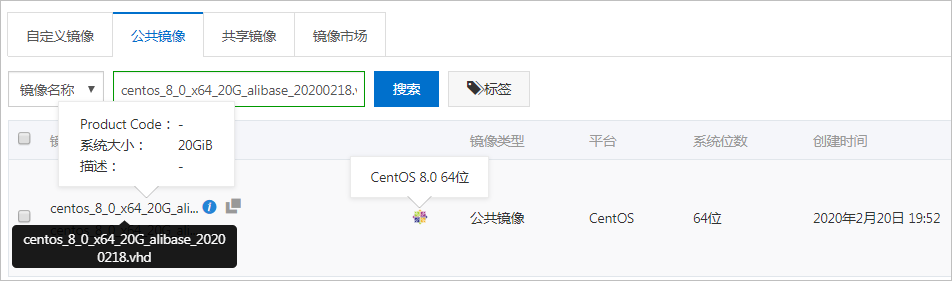
- 涉及镜像ID:centos_8_0_x64_20G_alibase_20200218.vhd。
- 修复方案:如果您需要使用CentOS 8.0的系统版本,可以通过RunInstances等接口,设置
ImageId=centos_8_0_x64_20G_alibase_20191225.vhd创建ECS实例。
Debian 9.6:经典网络配置问题
- 问题描述:无法Ping通使用Debian 9公共镜像创建的经典网络类型实例。
- 问题原因:因为Debian系统默认禁用了systemd-networkd服务,经典网络类型实例无法通过DHCP(Dynamic Host Configuration Protocol)模式自动分配IP。
- 涉及镜像ID:debian_9_06_64_20G_alibase_20181212.vhd。
- 修复方案:您需要依次运行下列命令解决该问题。
systemctl enable systemd-networkdsystemctl start systemd-networkd
CentOS 6.8:装有NFS Client的实例异常崩溃的问题
- 问题描述:加载了NFS客户端(NFS Client)的CentOS 6.8实例出现超长等待状态,只能通过重启实例解决该问题。
- 问题原因:在2.6.32-696~2.6.32-696.10的内核版本上使用NFS服务时,如果通信延迟出现毛刺(glitch,电子脉冲),内核nfsclient会主动断开TCP连接。若NFS服务端(Server)响应慢,nfsclient发起的连接可能会卡顿在FIN_WAIT2状态。正常情况下,FIN_WAIT2状态的连接默认在一分钟后超时并被回收,nfsclient可以发起重连。但是,由于此类内核版本的TCP实现有缺陷,FIN_WAIT2状态的连接永远不会超时,因此nfsclient的TCP连接永远无法关闭,无法发起新的连接,造成用户请求卡死(hang死),永远无法恢复,只能通过重启ECS实例进行修复。
- 涉及镜像ID:centos_6_08_32_40G_alibase_20170710.vhd和centos_6_08_64_20G_alibase_20170824.vhd。
- 修复方案:您可以运行yum update命令升级系统内核至2.6.32-696.11及以上版本。注意 操作实例时,请确保您已经提前创建了快照备份数据。具体操作,请参见创建普通快照。
CentOS 7:重启系统后主机名大写字母被修改
- 问题描述:第一次重启ECS实例后,部分CentOS 7实例的主机名(hostname)存在大写字母变成小写字母的现象,如下表所示。
实例hostname示例 第一次重启后示例 后续是否保持小写不变 iZm5e1qe*****sxx1ps5zX izm5e1qe*****sxx1ps5zx 是 ZZHost zzhost 是 NetworkNode networknode 是 - 涉及镜像:以下CentOS公共镜像,和基于以下公共镜像创建的自定义镜像。
- centos_7_2_64_40G_base_20170222.vhd
- centos_7_3_64_40G_base_20170322.vhd
- centos_7_03_64_40G_alibase_20170503.vhd
- centos_7_03_64_40G_alibase_20170523.vhd
- centos_7_03_64_40G_alibase_20170625.vhd
- centos_7_03_64_40G_alibase_20170710.vhd
- centos_7_02_64_20G_alibase_20170818.vhd
- centos_7_03_64_20G_alibase_20170818.vhd
- centos_7_04_64_20G_alibase_201701015.vhd
- 涉及Hostname类型:如果您的应用有hostname大小写敏感现象,重启实例后会影响业务。您可根据下面的修复方案修复以下类型的hostname。
hostname类型 是否受影响 何时受影响 是否继续阅读文档 在控制台或通过API创建实例时,hostname中有大写字母 是 第一次重启实例 是 在控制台或通过API创建实例时,hostname中全是小写字母 否 不适用 否 hostname中有大写字母,您登录实例后自行修改了hostname 否 不适用 是 - 修复方案:如果重启实例后需要保留带大写字母的hostname时,可按如下步骤操作。
- 远程连接实例。详情请参见连接方式介绍。
- 查看现有的hostname。
[root@izbp193*****3i161uynzzx ~]# hostname izbp193*****3i161uynzzx - 运行以下命令固化hostname。
hostnamectl set-hostname --static iZbp193*****3i161uynzzX - 运行以下命令查看更新后的hostname。
[root@izbp193*****3i161uynzzx ~]# hostname
iZbp193*****3i161uynzzX
- 下一步:如果您使用的是自定义镜像,请更新cloud-init软件至最新版本后,再次创建自定义镜像。避免使用存在该问题的自定义镜像创建新实例后发生同样的问题。
Linux:pip操作时的超时问题
- 问题描述:pip请求偶有超时或失败现象。
- 涉及镜像:CentOS、Debian、Ubuntu、SUSE、OpenSUSE、Alibaba Cloud Linux。
- 原因分析:阿里云提供了以下三个pip源地址。其中,默认访问地址为mirrors.aliyun.com,访问该地址的实例需能访问公网。当您的实例未分配公网IP时,会出现pip请求超时故障。
- (默认)公网:mirrors.aliyun.com
- 专有网络VPC内网:mirrors.cloud.aliyuncs.com
- 经典网络内网:mirrors.aliyuncs.com
- 修复方案:您可采用以下任一方法解决该问题。
- 方法一
为您的实例分配公网IP,即为实例绑定一个弹性公网IP(EIP)。
包年包月实例还可通过升降配重新分配公网IP。
- 方法二一旦出现pip响应延迟的情况,您可在ECS实例中运行脚本fix_pypi.sh,然后再重试pip操作。具体步骤如下:
- 远程连接实例。
- 运行以下命令获取脚本文件。
wget http://image-offline.oss-cn-hangzhou.aliyuncs.com/fix/fix_pypi.sh - 运行脚本。
- 专有网络VPC实例:运行命令
bash fix_pypi.sh "mirrors.cloud.aliyuncs.com"。 - 经典网络实例:运行命令
bash fix_pypi.sh "mirrors.aliyuncs.com"。
- 专有网络VPC实例:运行命令
- 重试pip操作。
fix_pypi.sh脚本内容如下:#!/bin/bash function config_pip() { pypi_source=$1 if [[ ! -f ~/.pydistutils.cfg ]]; then cat > ~/.pydistutils.cfg << eof="" easy_install="" index-url="http://
- 方法一