使用STS临时访问凭证访问OSS
网站编辑2022-01-18 15:25:08591
如何使用STS临时访问凭证访问OSS?您可以通过STS服务给其他用户颁发一个临时访问凭证。该用户可使用临时访问凭证在规定时间内访问您的OSS资源。临时访问凭证无需透露您的长期密钥,使您的OSS资源访问更加安全。适用场景
假设您是一个移动App开发者,希望使用阿里云OSS服务来保存App的终端用户数据,并且要保证每个App用户之间的数据隔离。此时,您可以使用STS授权用户直接访问OSS。
使用STS授权用户直接访问OSS的流程如下:
1.App用户登录。App用户和云账号无关,它是App的终端用户,App服务器支持App用户登录。对于每个有效的App用户来说,需要App服务器能定义出每个App用户的最小访问权限。
2.App服务器请求STS服务获取一个安全令牌(SecurityToken)。在调用STS之前,App服务器需要确定App用户的最小访问权限(用RAM Policy来自定义授权策略)以及凭证的过期时间。然后通过扮演角色(AssumeRole)来获取一个代表角色身份的安全令牌(SecurityToken)。
3.STS返回给App服务器一个临时访问凭证,包括一个安全令牌(SecurityToken)、临时访问密钥(AccessKeyId和AccessKeySecret)以及过期时间。
4.App服务器将临时访问凭证返回给App客户端,App客户端可以缓存这个凭证。当凭证失效时,App客户端需要向App服务器申请新的临时访问凭证。例如,临时访问凭证有效期为1小时,那么App客户端可以每30分钟向App服务器请求更新临时访问凭证。
5.App客户端使用本地缓存的临时访问凭证去请求OSS API。OSS收到访问请求后,会通过STS服务来验证访问凭证,正确响应用户请求。
步骤一:创建RAM用户
1.登录RAM控制台。
2.在左侧导航栏,选择身份管理 > 用户。
3.单击创建用户。
4.输入登录名称和显示名称。
5.在访问方式区域下,选择Open API 调用访问,然后单击确定。
6.单击复制,保存访问密钥(AccessKey ID 和 AccessKey Secret)。
步骤二:为RAM用户授予请求AssumeRole的权限
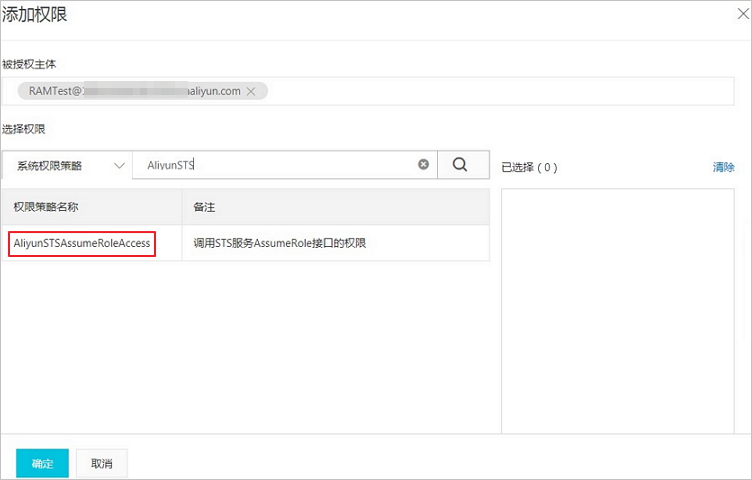
1.单击已创建RAM用户右侧对应的添加权限。
2.在添加权限页面,选择AliyunSTSAssumeRoleAccess系统策略。
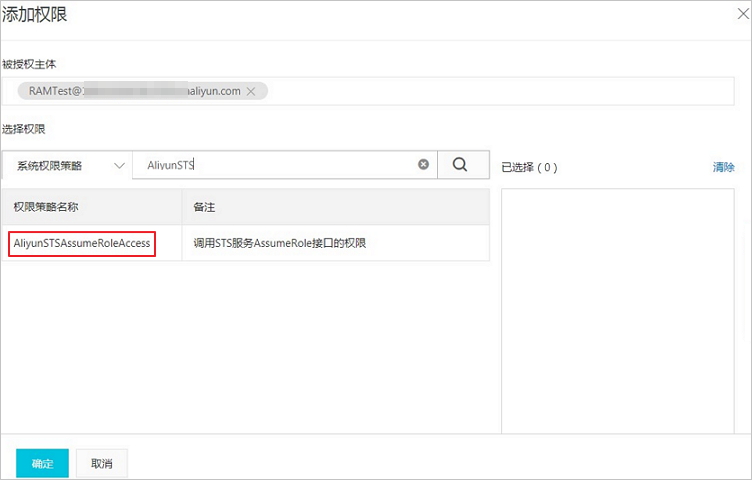
3.单击确定。
步骤三:创建用于获取临时访问凭证的角色
1.在左侧导航栏,选择身份管理 > 角色。
2.单击创建角色,选择可信实体类型为阿里云账号,单击下一步。
3.角色名称填写为RamOssTest,选择云账号为当前云账号。
4.单击完成。角色创建完成后,单击关闭。
5.在RAM角色管理页面,搜索框输入角色名称RamOssTest。
6.单击复制,保存角色的ARN。

步骤四:为角色授予上传文件的权限
1.创建上传文件的自定义权限策略。
(1)在左侧导航栏,选择权限管理 > 权限策略。
(2)单击创建权限策略。
(3)在创建权限策略页面,单击脚本编辑,然后在策略文档输入框中赋予角色向目标存储空间examplebucket下的目录exampledir上传文件的权限。具体配置示例如下。
{
"Version": "1",
"Statement": [
{
"Effect": "Allow",
"Action": [
"oss:PutObject"
],
"Resource": [
"acs:oss:*:*:examplebucket/exampledir",
"acs:oss:*:*:examplebucket/exampledir/*"
]
}
]
}
(5)在基本信息区域,填写策略名称为RamTestPolicy,然后单击确定。
2.为RAM角色RamOssTest授予自定义权限策略。
(1)在左侧导航栏,选择身份管理 > 角色。
(2)在角色页面,找到目标RAM角色RamOssTest。
(3)单击RAM角色RamOssTest右侧的添加权限。
(4)在添加权限页面下的自定义策略页签,选择已创建的自定义权限策略RamTestPolicy。
(5)单击确定。
步骤五:获取临时访问凭证
您可以通过调用STS服务接口AssumeRole 或者使用各语言STS SDK来获取临时访问凭证。
以下代码用于获取临时访问凭证:
import com.aliyuncs.DefaultAcsClient;
import com.aliyuncs.exceptions.ClientException;
import com.aliyuncs.http.MethodType;
import com.aliyuncs.profile.DefaultProfile;
import com.aliyuncs.profile.IClientProfile;
import com.aliyuncs.sts.model.v20150401.AssumeRoleRequest;
import com.aliyuncs.sts.model.v20150401.AssumeRoleResponse;
public class StsServiceSample {
public static void main(String[] args) {
// STS接入地址,例如sts.cn-hangzhou.aliyuncs.com。
String endpoint = "<sts-endpoint>";
// 填写步骤1生成的访问密钥AccessKey ID和AccessKey Secret。
String AccessKeyId = "<yourAccessKeyId>";
String accessKeySecret = "<yourAccessKeySecret>";
// 填写步骤3获取的角色ARN。
String roleArn = "<yourRoleArn>";
// 自定义角色会话名称,用来区分不同的令牌,例如可填写为SessionTest。
String roleSessionName = "<yourRoleSessionName>";
// 以下Policy用于限制仅允许使用临时访问凭证向目标存储空间examplebucket上传文件。
// 临时访问凭证最后获得的权限是步骤4设置的角色权限和该Policy设置权限的交集,即仅允许将文件上传至目标存储空间examplebucket下的exampledir目录。
String policy = "{\n" +
" \"Version\": \"1\", \n" +
" \"Statement\": [\n" +
" {\n" +
" \"Action\": [\n" +
" \"oss:PutObject\"\n" +
" ], \n" +
" \"Resource\": [\n" +
" \"acs:oss:*:*:examplebucket/*\" \n" +
" ], \n" +
" \"Effect\": \"Allow\"\n" +
" }\n" +
" ]\n" +
"}";
try {
// regionId表示RAM的地域ID。以华东1(杭州)地域为例,regionID填写为cn-hangzhou。也可以保留默认值,默认值为空字符串("")。
String regionId = "";
// 添加endpoint。适用于Java SDK 3.12.0及以上版本。
DefaultProfile.addEndpoint(regionId, "Sts", endpoint);
// 添加endpoint。适用于Java SDK 3.12.0以下版本。
// DefaultProfile.addEndpoint(endpointName, "", regionId, product: "Sts", endpoint);
// 构造default profile。
IClientProfile profile = DefaultProfile.getProfile(regionId, AccessKeyId, accessKeySecret);
// 构造client。
DefaultAcsClient client = new DefaultAcsClient(profile);
final AssumeRoleRequest request = new AssumeRoleRequest();
// 适用于Java SDK 3.12.0及以上版本。
request.setSysMethod(MethodType.POST);
// 适用于Java SDK 3.12.0以下版本。
//request.setMethod(MethodType.POST);
request.setRoleArn(roleArn);
request.setRoleSessionName(roleSessionName);
request.setPolicy(policy); // 如果policy为空,则用户将获得该角色下所有权限。
request.setDurationSeconds(3600L); // 设置临时访问凭证的有效时间为3600秒。
final AssumeRoleResponse response = client.getAcsResponse(request);
System.out.println("Expiration: " + response.getCredentials().getExpiration());
System.out.println("Access Key Id: " + response.getCredentials().getAccessKeyId());
System.out.println("Access Key Secret: " + response.getCredentials().getAccessKeySecret());
System.out.println("Security Token: " + response.getCredentials().getSecurityToken());
System.out.println("RequestId: " + response.getRequestId());
} catch (ClientException e) {
System.out.println("Failed:");
System.out.println("Error code: " + e.getErrCode());
System.out.println("Error message: " + e.getErrMsg());
System.out.println("RequestId: " + e.getRequestId());
}
}
}
步骤六:使用临时访问凭证上传文件至OSS
以Java SDK 3.12.0版本为例,将本地D:\\localpath路径下的exampletest.txt文件上传至存储空间examplebucket下的exampledir目录的示例代码如下:
import com.aliyuncs.DefaultAcsClient;
import com.aliyuncs.exceptions.ClientException;
import com.aliyuncs.http.MethodType;
import com.aliyuncs.profile.DefaultProfile;
import com.aliyuncs.profile.IClientProfile;
import com.aliyuncs.sts.model.v20150401.AssumeRoleRequest;
import com.aliyuncs.sts.model.v20150401.AssumeRoleResponse;
public class StsServiceSample {
public static void main(String[] args) {
// STS接入地址,例如sts.cn-hangzhou.aliyuncs.com。
String endpoint = "<sts-endpoint>";
// 填写步骤1生成的访问密钥AccessKey ID和AccessKey Secret。
String AccessKeyId = "<yourAccessKeyId>";
String accessKeySecret = "<yourAccessKeySecret>";
// 填写步骤3获取的角色ARN。
String roleArn = "<yourRoleArn>";
// 自定义角色会话名称,用来区分不同的令牌,例如可填写为SessionTest。
String roleSessionName = "<yourRoleSessionName>";
// 以下Policy用于限制仅允许使用临时访问凭证向目标存储空间examplebucket上传文件。
// 临时访问凭证最后获得的权限是步骤4设置的角色权限和该Policy设置权限的交集,即仅允许将文件上传至目标存储空间examplebucket下的exampledir目录。
String policy = "{\n" +
" \"Version\": \"1\", \n" +
" \"Statement\": [\n" +
" {\n" +
" \"Action\": [\n" +
" \"oss:PutObject\"\n" +
" ], \n" +
" \"Resource\": [\n" +
" \"acs:oss:*:*:examplebucket/*\" \n" +
" ], \n" +
" \"Effect\": \"Allow\"\n" +
" }\n" +
" ]\n" +
"}";
try {
// regionId表示RAM的地域ID。以华东1(杭州)地域为例,regionID填写为cn-hangzhou。也可以保留默认值,默认值为空字符串("")。
String regionId = "";
// 添加endpoint。适用于Java SDK 3.12.0及以上版本。
DefaultProfile.addEndpoint(regionId, "Sts", endpoint);
// 添加endpoint。适用于Java SDK 3.12.0以下版本。
// DefaultProfile.addEndpoint(endpointName, "", regionId, product: "Sts", endpoint);
// 构造default profile。
IClientProfile profile = DefaultProfile.getProfile(regionId, AccessKeyId, accessKeySecret);
// 构造client。
DefaultAcsClient client = new DefaultAcsClient(profile);
final AssumeRoleRequest request = new AssumeRoleRequest();
// 适用于Java SDK 3.12.0及以上版本。
request.setSysMethod(MethodType.POST);
// 适用于Java SDK 3.12.0以下版本。
//request.setMethod(MethodType.POST);
request.setRoleArn(roleArn);
request.setRoleSessionName(roleSessionName);
request.setPolicy(policy); // 如果policy为空,则用户将获得该角色下所有权限。
request.setDurationSeconds(3600L); // 设置临时访问凭证的有效时间为3600秒。
final AssumeRoleResponse response = client.getAcsResponse(request);
System.out.println("Expiration: " + response.getCredentials().getExpiration());
System.out.println("Access Key Id: " + response.getCredentials().getAccessKeyId());
System.out.println("Access Key Secret: " + response.getCredentials().getAccessKeySecret());
System.out.println("Security Token: " + response.getCredentials().getSecurityToken());
System.out.println("RequestId: " + response.getRequestId());
} catch (ClientException e) {
System.out.println("Failed:");
System.out.println("Error code: " + e.getErrCode());
System.out.println("Error message: " + e.getErrMsg());
System.out.println("RequestId: " + e.getRequestId());
}
}
}